OVERVIEW
The Layad Circuits Alphanumeric keyboard module is a
complete and fully-featured keyboard solution for your
Saleng Uno, Arduino or similar controller based projects.
The module features 96 standard conflict-free keys and
several function keys with tactile feedback. The module
can be easily connected to any device with a UART or I2C
interface. No additional special interface hardware (such
as PS2 or USB) required.

The Layad Circuits Alphanumeric keyboard comes in a
compact and slim form factor with corner mounting
holes which allow it to be readily integrated to panels
and fixtures. It has removable stylish circular key caps
which can be easily replaced or maybe labeled if desired.
It has a built-in power LED indicator and an activity LED
indicator.
The Layad Circuits Alphanumeric keyboard module has a
built-in processor which handles all the electronics level
processing of the keys. This ensures a very fast keyboard
response and optimum user experience.


FEATURES
- Complete, fully-featured keyboard with
- 96 standard conflict free keys and function keys
- Power Supply: 5V (get range)
- Typical Current Draw: <100mA
- Built-in processor ensuring fast response
- Built-in power LED indicator
- Built-in activity and caps lock LED indicator
- Interface:
o UART:
▪ 9600 baud, 8 databits, 1 Stop
bit, No Parity
▪ 5V logic level
o I2C:
▪ Up to 400kHz data transfer
speed
▪ 2 device addresses - Detachable and replaceable key caps with
tactile feedback - Slim and compact form factor: 113.28×87.88mm


APPLICATIONS
There are several applications involving the use of a
keyboard device as an input. Listed below are a few
examples.
- Access Control
- Security Systems
- Vending Machine
- Ticketing
POWER REQUIREMENTS - Point of Sales
- Kiosks
- General Purpose
Human-Machine Input
The module operates at 5 volts and has a typical current
draw of less than 100 milliamperes. This allows it to be
conveniently powered from the 5V output pin of the
Saleng Uno or any Arduino board.
JUMPER OPTIONS
When using the I2C interface, the user may switch
between two I2C slave addresses by installing or
uninstalling a microjumper between the pin labeled A0
and the adjacent GND pin.
- I2C address when A0 is not connected to GND=0x36
- I2C address when A0 is connected to GND=0x37
PIN FUNCTIONS
The module has a 10-position, double-row, 2.54mm
pitched header near the power LED indicator. However,
not all of the pins in this header are relevant to the user.
Below are descriptions of the pins that are of importance
to the user.


PRECAUTION
Use level shifters when using 3.3V microcontrollers to
safely connect the Alphanumeric Keyboard module to
your host.

APPLICATION NOTES
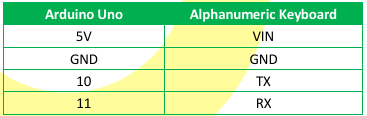
Example Using Software Serial
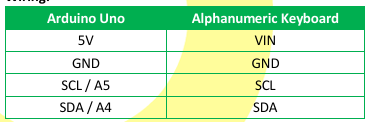
Wiring:
Code:
/* This software is free provided that this notice is
not removed and proper attribution  is accorded to Layad
Circuits and its Author(s). Layad Circuits invests
resources in producing free software. By purchasing
Layad Circuits' products or utilizing its services, you
support the continuing development of free software for
all.
Author(s): D. Deponio for Layad Circuits Electronics
Engineering
Revision: 1.0 - 2019/09/19 - initial creation
Layad Circuits Electronics Engineering Supplies and
Services
B314 Lopez Bldg., Session Rd. cor. Assumption Rd.,
Baguio City, Philippines
www.layadcircuits.com
general: info@layadcircuits.com
sales: sales@layadcircuits.com
+63-916-442-8565 */
#include "SoftwareSerial.h"
SoftwareSerial LCKeyboard(10, 11); // RX, TX
enum LCKey{
LCKey_u = 0x11,
LCKey_l,//0x12
LCKey_d,//0x13
LCKey_r,//0x14
LCKey_F1 = 0x82,
LCKey_F2, //0x83
LCKey_F3, //0x84
LCKey_F4, //0x85
LCKey_F5, //0x86
LCKey_F6, //0x87
LCKey_F7, //0x88
LCKey_F8, //0x89
LCKey_F9 //0x8A
};
Code:
/* This software is free provided that this notice is
not removed and proper attribution is accorded to Layad
Circuits and its Author(s).Layad Circuits invests
resources in producing free software. By purchasing
Layad Circuits'products or utilizing its services, you
support the continuing development of free softwarefor
all.
Author(s): D. Deponio for Layad Circuits Electronics
Engineering
Revision: 1.0 - 2019/09/19 - initial creation
Layad Circuits Electronics Engineering Supplies and
Services
B314 Lopez Bldg., Session Rd. cor. Assumption Rd.,
Baguio City, Philippines
www.layadcircuits.com
general: info@layadcircuits.com
sales: sales@layadcircuits.com
+63-916-442-8565 */
#define LCKEYBOARD_I2C_ADDRESS 0x36 //Default
//Adddress w/ microjumper installed at "A0".
// #define LCKEYBOARD_I2C_ADDRESS 0x37
#include <Wire.h>
enum LCKey{
LCKey_u = 0x11,
LCKey_l,//0x12
LCKey_d,//0x13
LCKey_r,//0x14
LCKey_F1 = 0x82,
LCKey_F2, //0x83
LCKey_F3, //0x84
LCKey_F4, //0x85
LCKey_F5, //0x86
LCKey_F6, //0x87
LCKey_F7, //0x88
LCKey_F8, //0x89
LCKey_F9 //0x8A
}; void setup() {
// put your setup code here, to run once:
Serial.begin(9600); // serial monitor
LCKeyboard.begin(9600); // LC Keyboard
}
void loop() {
// put your main code here, to run repeatedly:
if(LCKeyboard.available()){
uint8_t c = LCKeyboard.read(); // read the key
if(c){
// nonprintable characters
if(c == '\e') Serial.println(F("ESC"));
else if(c == 0x7F) Serial.println(F("DEL"));
else if(c == '\b') Serial.println(F("BACK"));
else if(c == '\t') Serial.println(F("TAB"));
else if(c == LCKey_u) Serial.println(F("UP"));
else if(c == LCKey_l) Serial.println(F("LEFT"));
else if(c == LCKey_d) Serial.println(F("DOWN"));
else if(c == LCKey_r)
Serial.println(F("RIGHT"));
// function keys
else if(c == LCKey_F1) Serial.println(F("F1"));
else if(c == LCKey_F2) Serial.println(F("F2"));
else if(c == LCKey_F3) Serial.println(F("F3"));
else if(c == LCKey_F4) Serial.println(F("F4"));
else if(c == LCKey_F5) Serial.println(F("F5"));
else if(c == LCKey_F6) Serial.println(F("F6"));
else if(c == LCKey_F7) Serial.println(F("F7"));
else if(c == LCKey_F8) Serial.println(F("F8"));
else if(c == LCKey_F9) Serial.println(F("F9"));
// printable characters
else Serial.print((char)c);
}
}
} void setup() {
// Wire.setClock(100000);
// Wire.setClock(400000);
Wire.begin();
// join i2c bus
Serial.begin(9600); // start serial for output
}
void loop() {
//Request a byte from the Alphanemuric Keyboard.
Wire.requestFrom(LCKEYBOARD_I2C_ADDRESS, 1);
if (Wire.available()) {
uint8_t c = Wire.read(); // read the key
if(c){
// nonprintable characters
if(c == '\e') Serial.println(F("ESC"));
else if(c == 0x7F) Serial.println(F("DEL"));
else if(c == '\b') Serial.println(F("BACK"));
else if(c == '\t') Serial.println(F("TAB"));
else if(c == LCKey_u) Serial.println(F("UP"));
else if(c == LCKey_l) Serial.println(F("LEFT"));
else if(c == LCKey_d) Serial.println(F("DOWN"));
else if(c == LCKey_r)
Serial.println(F("RIGHT"));
// function keys
else if(c == LCKey_F1) Serial.println(F("F1"));
else if(c == LCKey_F2) Serial.println(F("F2"));
else if(c == LCKey_F3) Serial.println(F("F3"));
else if(c == LCKey_F4) Serial.println(F("F4"));
else if(c == LCKey_F5) Serial.println(F("F5"));
else if(c == LCKey_F6) Serial.println(F("F6"));
else if(c == LCKey_F7) Serial.println(F("F7"));
else if(c == LCKey_F8) Serial.println(F("F8"));
else if(c == LCKey_F9) Serial.println(F("F9"));
// printable characters
else Serial.print((char)c);
}
}
}