


DESCRIPTION
SCHEMATIC
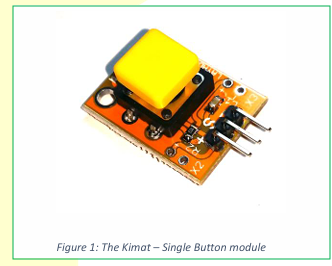
The Single Button module is a compact module that
integrates a 12x12mm tactile momentary button, pullup
resistor and a LED indicator. It also comes with a
breadboard/Arduino friendly pin headers. The Single
Button module is part of Layad Circuits’ Kimat series of
rapid prototyping products.

When the push button is pressed, current flows through
LED1 via R1 and hence, will light up the LED. Depressing
the button turns the LED off. The output at the S is
normally high when the button is not pressed due to
the pull-up resistor R2. C1 and R2 also serves as a low
pass filter to help smooth out mechanical bounce.
FEATURES
APPLICATIONS NOTES
- 12x12mm tactile momentary switch
- LED indicator for the switch
- Integrated pull-up resistor
- Compatible with 3.3V or 5V controllers
- Compact form factor, board dimensions:
- 25x19mm
- Standard 2.54mm pitch headers. Breadboard
- friendly.
Buttons are among the simplest and fastest user input
method for microcontroller projects. To prevent the
signal from floating, you often need to connect external
pull-up or pull-down resistors when working with
GPIO’s without internal. You may also want to add an
LED to indicate the state of the button. In some
instances, this seemingly simple task may turn
troublesome especially for multiple buttons. This is why
we have this module. It is a ready-made push button for
general purpose user input.


Wiring and Testing
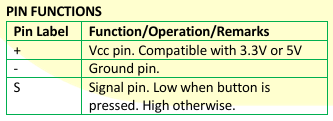
When used with the Saleng or Arduino Uno, connect
the + and – pin to the Arduino’s 5V and GND pins
respectively. The S pin may be connected to any input
pin.
The output viewed from the Serial Monitor with a 9600
baud rate.
The Single Button module has 2 extra headers labeled
X2 and X3. These are connected to the + and – pins on
the main header and will be useful when using more
than one button and using them side by side. Figure 4
illustrates this.

The Arduino sketch that follows is a basic test code you
may use for this module.

const byte BUTTON = 2;
void setup() {
pinMode(BUTTON,INPUT); // no need to enable
pullup
Serial.begin(9600);
}
void loop() {
if(digitalRead(BUTTON) == LOW)
Serial.println(“PRESSED”);
else Serial.println(“NOT PRESSED”);
}